
10 Browser extensions for marketers that will make your life easier
About the Author: Noa Eshed

Find me on:

Introduction – extensions for marketers
As marketers, we have to deal with lots of data and multitasking. My browser is packed with extensions that make my web experience more efficient and accurate. Here’s a review of my ultimate 10 favorite browser extensions for marketers (and others).
1. goo.gl URL Shortener
This extension enables shortening URLs with a click saving you the process of copying URLs, opening a new tab with a URL shortener site, pasting the URL and copying the generated link.
After adding this extension, whenever you’d like to shorten a link, just click on the extension button on your browser’s toolbar.
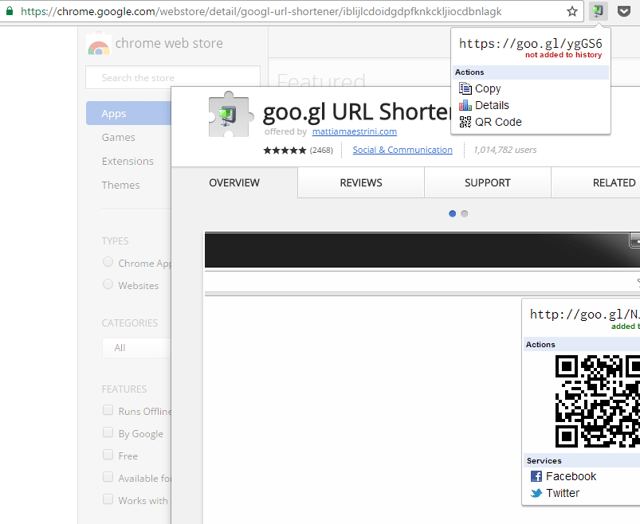
I don’t know who you people using QR codes are, but this extension can also help you on that end.
Shortening URLs is generally a good idea for two main reasons:
- It’s friendlier to share a short link on social media. Especially ugly ones with many parameters.
- You can then track each shortened link individually to find out how many clicks it received and the source of the click.
2. SimilarWeb – site traffic sources and ranking
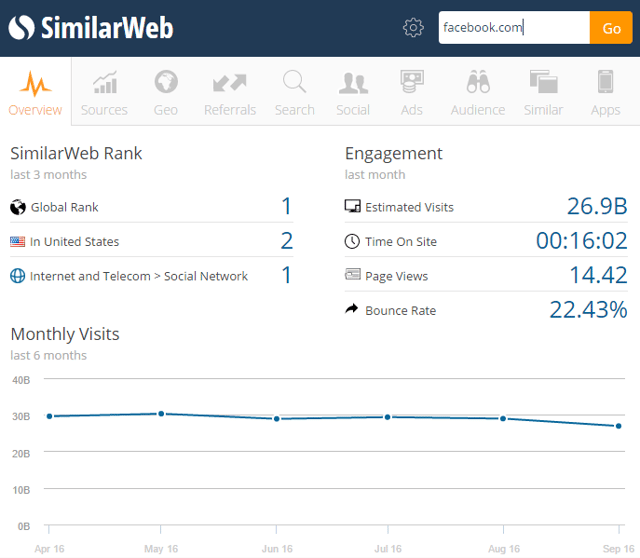
SimilarWeb’s extension provides instant data about websites you visit. Clicking it will enable a quick overview of the website’s stats including monthly visits, average time spent on site, page views, bounce rates, traffic sources and audience interests.
3. Alexa traffic rank
With Alexa you can simply hover over the Alexa button to see the traffic rank of the website you are visiting. Another fun reason to add this extension is the “wayback machine” that enables taking a nostalgic trip down memory lane and seeing how websites used to look on different dates. That could also be useful for restoring content you may have accidently deleted (yet I wouldn’t count on it as a backing up strategy).
4. Ghostery
You can learn much about a company’s marketing by finding out what type of trackers the company has installed on their website. Ghostery will provide precisely those insights. You’ll be able to get a good understanding of the company’s marketing efforts by learning what advertising data they are tracking, conversions they are measuring, whether or not they are using marketing automation tools and much more.
5. Buffer
Creating valuable content is a constant challenge for most marketers. Sometimes we forget that sharing the content of others could be super relevant to our followers. Buffer helps to easily cross-share content you stumble upon to your Facebook, Twitter, Linkedin, Pinterest and Reddit accounts. After adding this extension, you will notice the buffer button overlaying images, videos and other content that you browse.
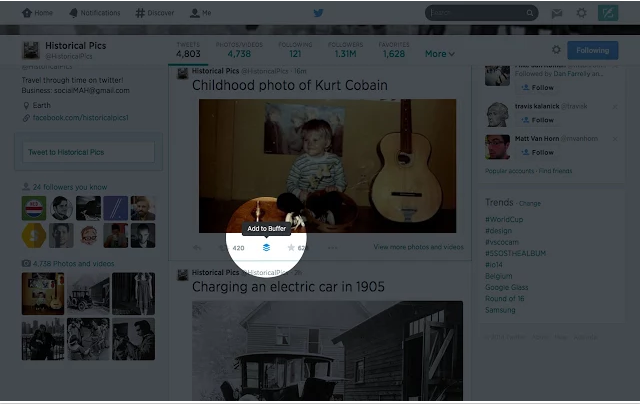
When you find something you think is worth sharing while browsing add it to your buffer queue by clicking on the Buffer button or by using the shortcut “ctrl+b” – buffer will tweet and post on your behalf at optimized hours, making sure to space out your content. This is a great extension for maintaining consistency and generating engagement.
Pro tip: you can create IFTTT (if this then that) “recipes” for publishing new blog posts you create or any other content that you’d like to be automatically shared under certain conditions.
6. Save to Pocket
Save content to read later with a click. This extension is great for prioritizing and time management. Just make sure that your pocket reading list doesn’t become a black hole of unread content and good intent.

7, Evernote Web Clipper
This is a great extension for easily clipping and saving selected texts and images from websites. I use it mostly for content research. In order to save content, click the Evernote button on your toolbar and select the relevant clip you’d like to create.
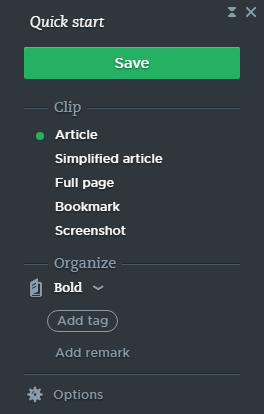
You will also be able to easily share your clip on social media or via email.
8. TinEye Reverse Image Search
This great extension will show you where an image came from. After adding it, right click on the image you’d like to trace back and choose “search image on TinEye”
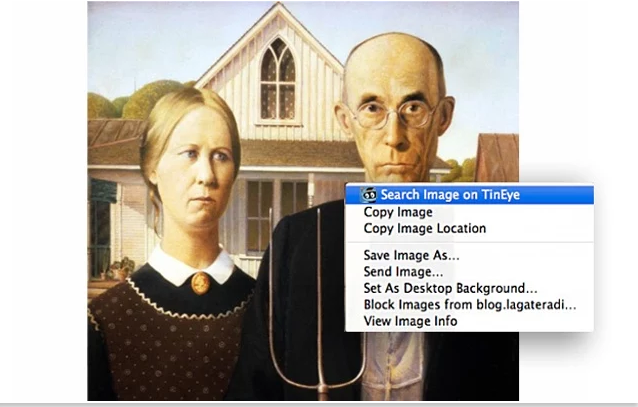
I mostly use this for finding better resolution images.
9. ColoZilla
This is a useful extension for getting a color reading from any point in your browser.
10. HubSpot Sales
This extension’s free features will help you:
- track your emails by notifying you when a recipient has opened or clicked an email you’ve sent.
- show you information about recipients such as their company, title and recent tweets.
- Schedule emails to be sent at a later time.

Final note
I hope you’ll find these extensions useful. If you have more recommendations, do share!
If you found this useful, and you’re curious to learn more and find out how to step up your marketing I invite you to download our How-To guide for creating an inbound marketing strategy.

Noa Eshed
Noa is the co-author of the Amazon no.1 Bestseller "The Smart Marketer's Guide to Google AdWords" and co-host of the podcast "Real Life Superpowers". She's a content lover, certified journalist & lawyer (Hebrew U). She practices martial arts & yoga. She's been consulting and helping businesses create a significant presence online since 2010.
SHARE THIS STORY
Noa is the co-author of the Amazon no.1 Bestseller "The Smart Marketer's Guide to Google AdWords" and co-host of the podcast "Real Life Superpowers". She's a content lover, certified journalist & lawyer (Hebrew U). She practices martial arts & yoga. She's been consulting and helping businesses create a significant presence online since 2010.


